以下资料全部来源于:butterfly官网

文章更新记录:

2022

02-23

添加labs

02-20

创建文章

Page Front-matter参数说明

Front-matter 是 markdown 文件最上方以 --- 分隔的区域,用于指定个别档案的变数。

  • Page Front-matter 用于页面配置
  • Post Front-matter 用于文章页配置

    如果标注可选的参数,可根据自己需要添加,不用全部都写在markdown里

page Front-matter

1
2
3
4
5
6
7
8
9
10
11
12
13
14
15
---
title:
date:
updated:
type:
comments:
description:
keywords:
top_img:
mathjax:
katex:
aside:
aplayer:
highlight_shrink:
---
写法 解释
date 【必需】页面创建日期
type 【必需】标籤、分类和友情链接三个页面需要配置
updated 【可选】页面更新日期
description 【可选】页面描述
keywords 【可选】页面关键字
comments 【可选】显示页面评论模块(默认 true)
top_img 【可选】页面顶部图片
mathjax 【可选】显示mathjax(当设置mathjax的per_page: false时,才需要配置,默认 false)
katex 【可选】显示katex(当设置katex的per_page: false时,才需要配置,默认 false)
aside 【可选】显示侧边栏 (默认 true)
aplayer 【可选】在需要的页面加载aplayer的js和css,请参考文章下面的音乐 配置
highlight_shrink 【可选】配置代码框是否展开(true/false)(默认为设置中highlight_shrink的配置)

Post Front-matter

1
2
3
4
5
6
7
8
9
10
11
12
13
14
15
16
17
18
19
20
21
22
23
24
25
---
title:
date:
updated:
tags:
categories:
keywords:
description:
top_img:
comments:
cover:
toc:
toc_number:
toc_style_simple:
copyright:
copyright_author:
copyright_author_href:
copyright_url:
copyright_info:
mathjax:
katex:
aplayer:
highlight_shrink:
aside:
---
写法 解释
title 【必需】文章标题
date 【必需】文章创建日期
updated 【可选】文章更新日期
tags 【可选】文章标籤
categories 【可选】文章分类
keywords 【可选】文章关键字
description 【可选】文章描述
top_img 【可选】文章顶部图片
cover 【可选】文章缩略图(如果没有设置top_img,文章页顶部将显示缩略图,可设为false/图片地址/留空)
comments 【可选】显示文章评论模块(默认 true)
toc 【可选】显示文章TOC(默认为设置中toc的enable配置)
toc_number 【可选】显示toc_number(默认为设置中toc的number配置)
toc_style_simple 【可选】显示 toc 简洁模式
copyright 【可选】显示文章版权模块(默认为设置中post_copyright的enable配置)
copyright_author 【可选】文章版权模块的文章作者
copyright_author_href 【可选】文章版权模块的文章作者链接
copyright_url 【可选】文章版权模块的文章连结链接
copyright_info 【可选】文章版权模块的版权声明文字
mathjax 【可选】显示mathjax(当设置mathjax的per_page: false时,才需要配置,默认 false)
katex 【可选】显示katex(当设置katex的per_page: false时,才需要配置,默认 false)
aplayer 【可选】在需要的页面加载aplayer的js和css,请参考文章下面的音乐 配置
highlight_shrink 【可选】配置代码框是否展开(true/false)(默认为设置中highlight_shrink的配置)
aside 【可选】显示侧边栏 (默认 true)

标签外挂

label

高亮所需的文字

1
{% label text color %}
写法 解释
color 【可选】背景颜色,默认为 default,default/blue/pink/red/purple/orange/green

例子

1
2
臣亮言:{% label 先帝 %}创业未半,而{% label 中道崩殂 blue %}。今天下三分,{% label 益州疲敝 pink %},此诚{% label 危急存亡之秋 red %}也!然侍衞之臣,不懈于内;{% label 忠志之士 purple %},忘身于外者,盖追先帝之殊遇,欲报之于陛下也。诚宜开张圣听,以光先帝遗德,恢弘志士之气;不宜妄自菲薄,引喻失义,以塞忠谏之路也。
宫中、府中,俱为一体;陟罚臧否,不宜异同。若有{% label 作奸 orange %}、{% label 犯科 green %},及为忠善者,宜付有司,论其刑赏,以昭陛下平明之治;不宜偏私,使内外异法也。

臣亮言:先帝 创业未半,而中道崩殂 。今天下三分,益州疲敝 ,此诚危急存亡之秋 也!然侍衞之臣,不懈于内;忠志之士 ,忘身于外者,盖追先帝之殊遇,欲报之于陛下也。诚宜开张圣听,以光先帝遗德,恢弘志士之气;不宜妄自菲薄,引喻失义,以塞忠谏之路也。
宫中、府中,俱为一体;陟罚臧否,不宜异同。若有作奸犯科 ,及为忠善者,宜付有司,论其刑赏,以昭陛下平明之治;不宜偏私,使内外异法也。

Note (Bootstrap Callout)

3.2版本以上支持

语法测试

名称 用法
color 【可选】顔色(default / blue / pink / red / purple / orange / green)
icon 【可选】可配置自定义 icon (只支持 fontawesome 图标, 也可以配置 no-icon )
style 【可选】可以覆盖配置中的 style(simple/modern/flat/disabled)
1
2
3
{% note [color] [icon] [style] %}
Any content (support inline tags too.io).
{% endnote %}

simple

1
2
3
4
5
6
7
8
9
10
11
12
13
14
15
16
17
18
19
20
21
{% note 'fab fa-cc-visa' simple %}
你是刷 Visa 还是 UnionPay
{% endnote %}
{% note blue 'fas fa-bullhorn' simple %}
2021年快到了....
{% endnote %}
{% note pink 'fas fa-car-crash' simple %}
小心开车 安全至上
{% endnote %}
{% note red 'fas fa-fan' simple%}
这是三片呢?还是四片?
{% endnote %}
{% note orange 'fas fa-battery-half' simple %}
你是刷 Visa 还是 UnionPay
{% endnote %}
{% note purple 'far fa-hand-scissors' simple %}
剪刀石头布
{% endnote %}
{% note green 'fab fa-internet-explorer' simple %}
前端最讨厌的浏览器
{% endnote %}

你是刷 Visa 还是 UnionPay

2021年快到了….

小心开车 安全至上

这是三片呢?还是四片?

你是刷 Visa 还是 UnionPay

剪刀石头布

前端最讨厌的浏览器

modern

1
2
3
4
5
6
7
8
9
10
11
12
13
14
15
16
17
18
19
20
21
{% note 'fab fa-cc-visa' modern %}
你是刷 Visa 还是 UnionPay
{% endnote %}
{% note blue 'fas fa-bullhorn' modern %}
2021年快到了....
{% endnote %}
{% note pink 'fas fa-car-crash' modern %}
小心开车 安全至上
{% endnote %}
{% note red 'fas fa-fan' modern%}
这是三片呢?还是四片?
{% endnote %}
{% note orange 'fas fa-battery-half' modern %}
你是刷 Visa 还是 UnionPay
{% endnote %}
{% note purple 'far fa-hand-scissors' modern %}
剪刀石头布
{% endnote %}
{% note green 'fab fa-internet-explorer' modern %}
前端最讨厌的浏览器
{% endnote %}

你是刷 Visa 还是 UnionPay

2021年快到了….

小心开车 安全至上

这是三片呢?还是四片?

你是刷 Visa 还是 UnionPay

剪刀石头布

前端最讨厌的浏览器

disable

1
2
3
4
5
6
7
8
9
10
11
12
13
14
15
16
17
18
19
20
21
{% note 'fab fa-cc-visa' disabled %}
你是刷 Visa 还是 UnionPay
{% endnote %}
{% note blue 'fas fa-bullhorn' disabled %}
2021年快到了....
{% endnote %}
{% note pink 'fas fa-car-crash' disabled %}
小心开车 安全至上
{% endnote %}
{% note red 'fas fa-fan' disabled %}
这是三片呢?还是四片?
{% endnote %}
{% note orange 'fas fa-battery-half' disabled %}
你是刷 Visa 还是 UnionPay
{% endnote %}
{% note purple 'far fa-hand-scissors' disabled %}
剪刀石头布
{% endnote %}
{% note green 'fab fa-internet-explorer' disabled %}
前端最讨厌的浏览器
{% endnote %}

你是刷 Visa 还是 UnionPay

2021年快到了….

小心开车 安全至上

这是三片呢?还是四片?

你是刷 Visa 还是 UnionPay

剪刀石头布

前端最讨厌的浏览器

no-icons

1
2
3
4
5
6
7
8
9
10
11
12
13
14
15
16
17
18
19
20
21
{% note no-icon %}
你是刷 Visa 还是 UnionPay
{% endnote %}
{% note blue no-icon %}
2021年快到了....
{% endnote %}
{% note pink no-icon %}
小心开车 安全至上
{% endnote %}
{% note red no-icon %}
这是三片呢?还是四片?
{% endnote %}
{% note orange no-icon %}
你是刷 Visa 还是 UnionPay
{% endnote %}
{% note purple no-icon %}
剪刀石头布
{% endnote %}
{% note green no-icon %}
前端最讨厌的浏览器
{% endnote %}

你是刷 Visa 还是 UnionPay

2021年快到了….

小心开车 安全至上

这是三片呢?还是四片?

你是刷 Visa 还是 UnionPay

剪刀石头布

前端最讨厌的浏览器

Tabs

使用方法

1
2
3
4
5
6
7
8
9
10
11
12
13
14
15
16
17
18
19
20
21
{% tabs Unique name, [index] %}
<!-- tab [Tab caption] [@icon] -->
Any content (support inline tags too).
<!-- endtab -->
{% endtabs %}

Unique name : Unique name of tabs block tag without comma.
Will be used in #id's as prefix for each tab with their index numbers.
If there are whitespaces in name, for generate #id all whitespaces will replaced by dashes.
Only for current url of post/page must be unique!
[index] : Index number of active tab.
If not specified, first tab (1) will be selected.
If index is -1, no tab will be selected. It's will be something like spoiler.
Optional parameter.
[Tab caption] : Caption of current tab.
If not caption specified, unique name with tab index suffix will be used as caption of tab.
If not caption specified, but specified icon, caption will empty.
Optional parameter.
[@icon] : FontAwesome icon name (full-name, look like 'fas fa-font')
Can be specified with or without space; e.g. 'Tab caption @icon' similar to 'Tab caption@icon'.
Optional parameter.

Demo 1 - 预设选择第一个【默认】

1
2
3
4
5
6
7
8
9
10
11
12
13
{% tabs test1 %}
<!-- tab -->
**This is Tab 1.**
<!-- endtab -->

<!-- tab -->
**This is Tab 2.**
<!-- endtab -->

<!-- tab -->
**This is Tab 3.**
<!-- endtab -->
{% endtabs %}

This is Tab 1.

This is Tab 2.

This is Tab 3.

Demo 2 - 预设选择tabs

1
2
3
4
5
6
7
8
9
10
11
12
13
{% tabs test2, 3 %}
<!-- tab -->
**This is Tab 1.**
<!-- endtab -->

<!-- tab -->
**This is Tab 2.**
<!-- endtab -->

<!-- tab -->
**This is Tab 3.**
<!-- endtab -->
{% endtabs %}

This is Tab 1.

This is Tab 2.

This is Tab 3.

Demo 3 - 自定义Tab名 + 只有icon + icon和Tab名

1
2
3
4
5
6
7
8
9
10
11
12
13
{% tabs test4 %}
<!-- tab 第一个Tab -->
**tab名字为第一个Tab**
<!-- endtab -->

<!-- tab @fab fa-apple-pay -->
**只有图标 没有Tab名字**
<!-- endtab -->

<!-- tab 炸弹@fas fa-bomb -->
**名字+icon**
<!-- endtab -->
{% endtabs %}

tab名字为第一个Tab

只有图标 没有Tab名字

名字+icon

Demo 4 - 没有预设值

1
2
3
4
5
6
7
8
9
10
11
12
13
{% tabs test3, -1 %}
<!-- tab -->
**This is Tab 1.**
<!-- endtab -->

<!-- tab -->
**This is Tab 2.**
<!-- endtab -->

<!-- tab -->
**This is Tab 3.**
<!-- endtab -->
{% endtabs %}

This is Tab 1.

This is Tab 2.

This is Tab 3.

网站ICON

Butterfly主题内置了 Font Awesome V5图标,目前已更新到 5.13.0,总共有1,588个免费图标。由于是国外的图标网站,对于国内的一些网站Icon并不支持。如有需要,你可以引入其它的图标服务商。

iconfont 平台

国内最出名的莫过于iconfont,功能很强大且图标内容很丰富的矢量图标库。很多Font Awesome不支持的图标都可以在这里找到。同时,iconfont支持选择需要的图标生成css链接,减少不必要的CSS加载。

注册账号

打开iconfont的网站,点击导航栏的人像图标,会跳出註册界面,按要求註册账号。

添加图标入库

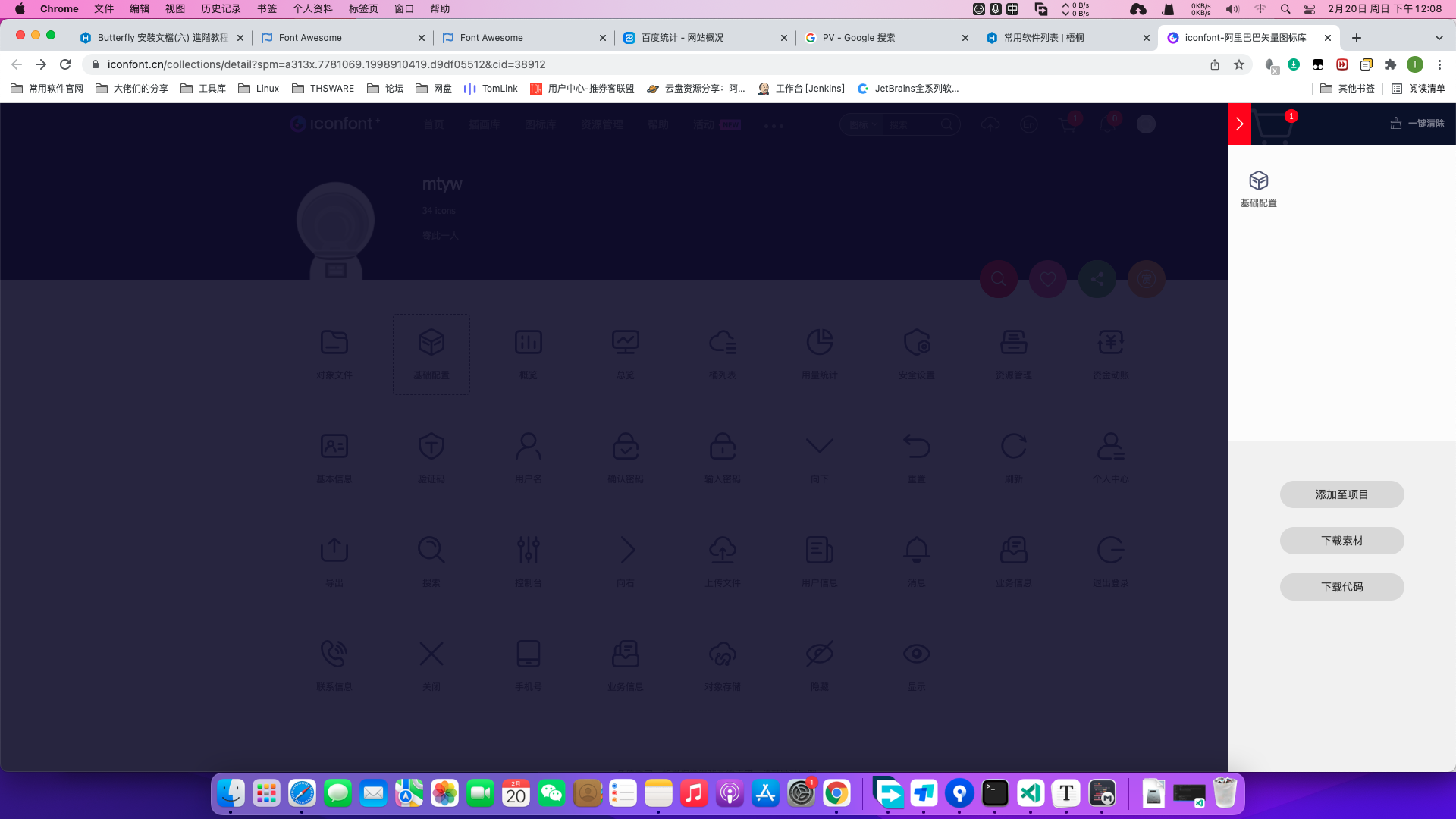
添加入库后,你可以看到网站右上角购物车图标显示了1字,代表图标已经添加入库,点击购物车图标,会弹出侧边栏显示详情。
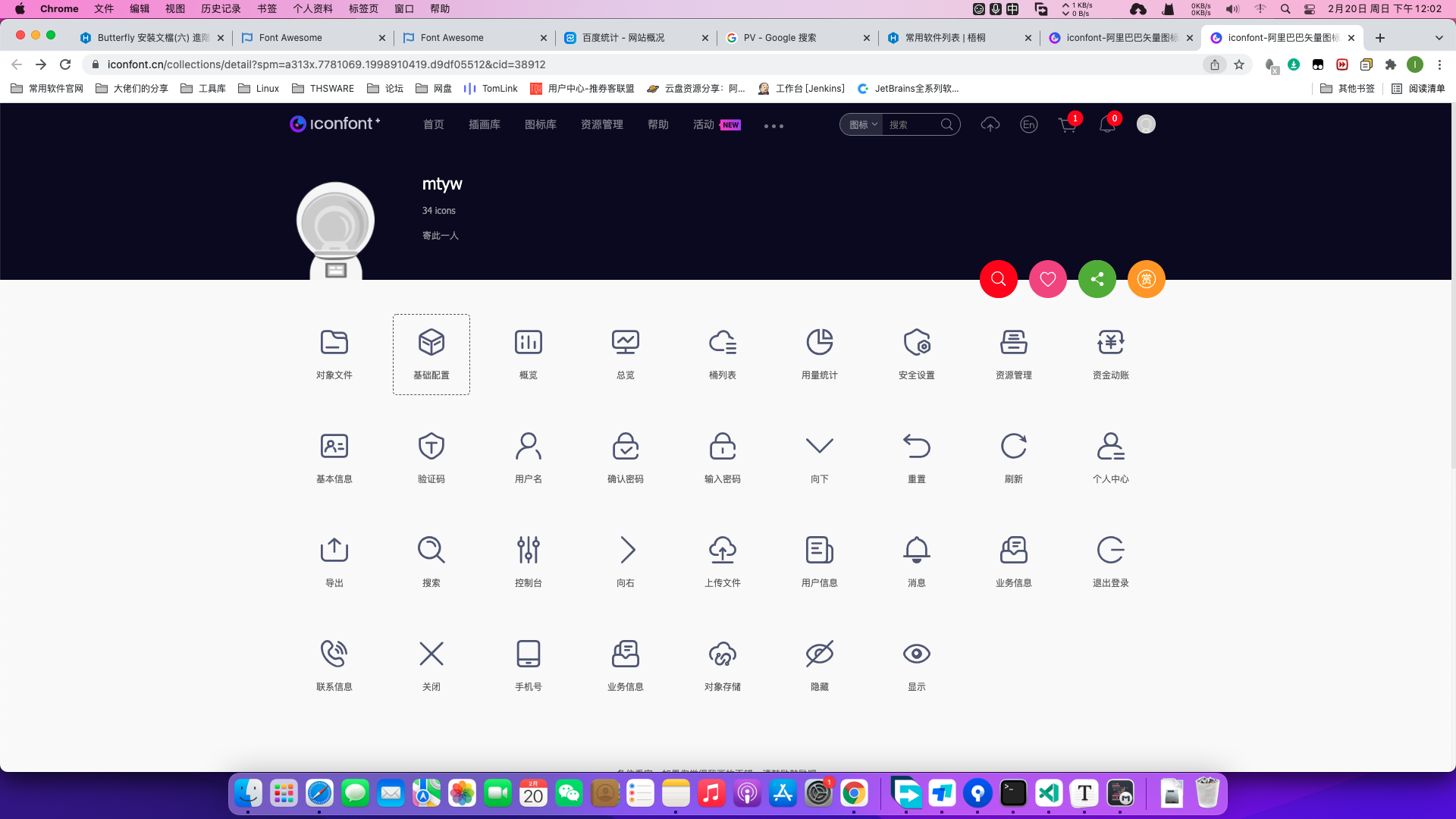
20220220120650
已选择的图标会显示在上面,你可以重复上面的操作,把需要的图标添加入库,然后点击添加到项目。接下来会要求选择项目名称吗,没有的自己创建一个。
20220220120904

生成链接

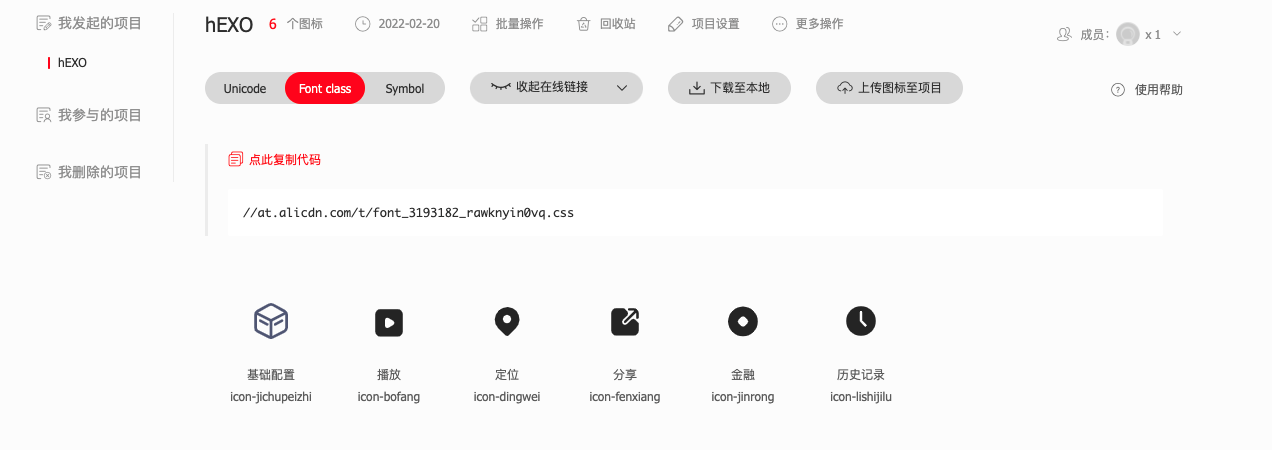
在添加到项目之后,会跳到项目的详情界面。点击Font class,然后再点击暂无代码,点击生成文字。网站会自动生成CSS链接,我们只需要复製链接就行。
20220220121235

添加链接进主题配置文件

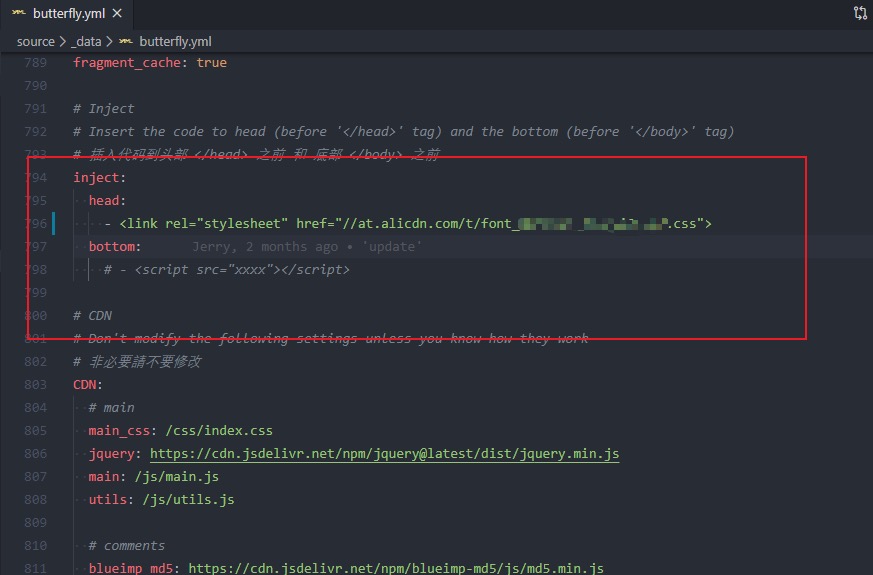
打开主题配置文件,找到inject配置,按要求把链接填入
20220220121330
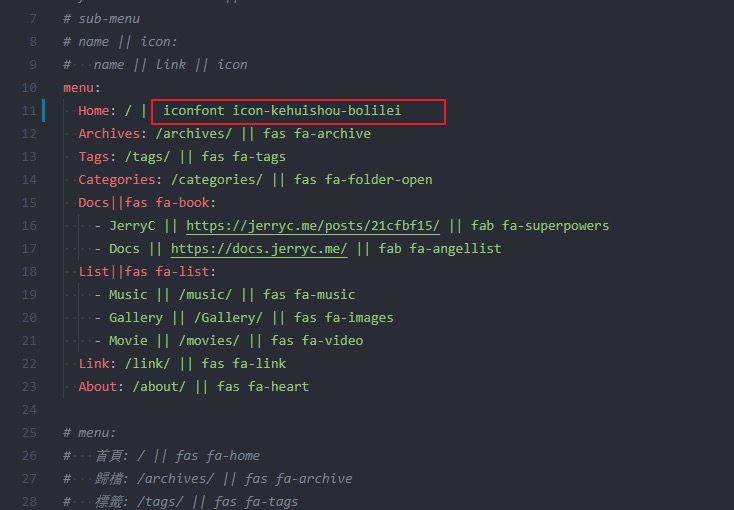
在我们需要使用的地方填入icon,例如Menu,图片使用格式为iconfont icon名字

20220220121407